Pages

Showing posts with label Linux. Show all posts

Friday, 5 June 2015

First Impressions of Linux: Preliminary Comments

(This is part 4 of a multi part thread. For part one click here).

I’m going to freely admit that with my attempt to install Ubuntu to my media PC I gave the OS next to no time, and I’m not in any position to make any statements about how good or bad Linux is compared to Windows. I’m also aware that many of the problems I have discussed in this post are due, at least in part, to the nature of community driven open source development rather than problems with Linux itself. And that I could have solved all these issues had I given the OS more time. I’m also going to admit that a media PC / DVR was perhaps not the ideal learning environment.

That said I've got a couple of observations that I think are relevant to any newbies going into Linux from Windows;


Going into Linux as a Newbie

- Do your research first. Knowing the benefits and limitations of the system before going in will save a lot of troubles.

- Look into the distros. Linux comes in a variety of flavours, each with different setups. If you need a system with proprietary drivers, WINE or a DVR it may be easier to install a distro that has those things pre-installed and configured. Finding the distro that best suits your needs first may mean you spend less time and frustration trying to setup the system in the long run.

- Understand hardware limitations. If all you want is a basic word processing and internet machine then any hardware will probably be fine. But if you want something a bit more specialised, perhaps a gaming rig or DVR, repurposing an old Windows PC may not be the best idea. Make sure your hardware is fully supported before you start. In some cases it may be better to build a new system that is better supported by Linux to get the best performance.

- Understand that Linux is largely developed and supported by hobbyists and enthusiasts. Things are not always as streamlined or polished as they are on Windows, and oftentimes instructions are written with the assumption that the reader already has a level of Linux experience. There is not always a ‘correct way’ of doing things, and advice can often be fragmentary. Be prepared to get your hands dirty to solve problems.

Going Forward

So, have I finished with Linux now? No, not at all. I’m still very interested in trying out Linux properly. I’ve got a couple of options. Installing onto my laptop might be the best for an actual sit-down-and-use-it setup. Otherwise I could install Linux onto my gaming PC. This would probably be best for trying out Linux as a gaming OS. The question then is do I split my current SSD into a Windows partition and a Linux partition and run games from a conventional HDD - or do I pick up a second SSD to run Linux?

I also still have my Raspberry Pi B+ that I’m pretty keen to set up as a basic media PC / Kodi machine for the bedroom.

Wednesday, 3 June 2015

Linux First Impressions - 3 Weeks In: Back to Windows 7

 (This post is part 3 of an ongoing series of posts on Linux. For my first post click here)

So after three weeks of using Ubuntu on my media PC I’ve scrapped it and gone back to Windows 7. The reason? Simply put, it got too difficult. Compared to Windows a Linux media PC setup is a bit of a headache.

At least for New Zealand it is...


Some extra background is probably necessary. Back in December we bought our first home (the reason why this blog has been so slow this year). In New Zealand the analogue TV broadcast was switched off on 1st December 2013, making live TV available only through digital DVB-T and DVB-S sources. The house we purchased didn’t have a satellite dish or DVB-T aerial, meaning we effectively didn’t have access to the live TV broadcast. Which was absolutely fine. Like everywhere, live TV in New Zealand sucks - and we were happy with streaming everything we want to watch. When I initially installed Ubuntu I was happy to make the TV capture card and live TV recording secondary priorities.

But it has been our intention of installing a DVB-T aerial eventually. There are some shows that are just easier to watch live, the News for example (New Zealand’s local streaming services really suck). And with Abby growing up it would be good to have an easier way for her to access cartoons and kids shows than searching for them through Kodi.

So last week a contractor put up an advertisement on a local social media page with cheap DVB-T aerial installations. We jumped on the chance, and once again we had access to live TV. Being able to record television suddenly became available.

And Ubuntu became a problem…


Weird Installation Foibles of Linux

I’ve found that in some situations it can be very difficult to install software within Linux if you aren’t totally competent with what you are doing.

Linux is developed and maintained by the community, which gives the OS many benefits over Windows. But one of the big downsides is that there are many situations that simply don't have straightforward solutions. Everyone has their own opinions of how things should be done. Their own 'correct way'. As a result I've found that Linux tends to been very fractured when it comes to advice on how to install software packages. Advice tends to be anecdotal, and often times instructions from different sources can be contradictory or outdated.


Installing MythTV

For example, I chose MythTV as my DVR software, mostly because it seemed to be most popular solution. But I never actually got to the point of installing MythTV because figuring it all out proved to be a real headache.

With MythTV some bloggers and forum commenters recommended simply installing it onto an Ubuntu system from the repositories with sudo apt-get update, sudo apt-get install MythTV. But then the MythTV official wiki lists a page of dependencies that must be installed to the OS for MythTV to work. Are these installed by default with sudo apt-get install MythTV? How do I know if I have them, that they are functioning, and if they need to be configured? Still others warned that by installing MythTV with sudo apt-get install MythTV you can mess up the configuration and flummox up the installation, and instead recommended downloading a purpose built distro like Mythbuntu that already has everything set up and ready to go. Still others argued that they had never had a stable installation using Mythbuntu. The official Ubuntu documentation wiki has its own instructions for installing MythTV. But these instructions were posted in 2008. Are they still relevant?

None of this is actually Ubuntu's problem. Canonical is not responsible for the work of other dev teams or forum users. Well, with the exception of outdated entries on the official Ubuntu wiki that is. But it is a dauntingly steep learning curve for someone coming in as a complete newbie. I found myself knee deep in research, trying to cobble together answers from blog and forum posts and trawling through the wiki's and forums.

Sapphire Radeon HD5750. 
Image: www.sapphiretech.com

Choosing a Graphics Driver

And even if I did get the MythTV installation figured out, in the end the MythTV front end may not even play nice with my AMD card. Many forum comments noted choppy playback and poor performance with AMD hardware that required a fairly large amount of troubleshooting to fix. Partly because the AMD Linux driver support isn't great, and partly because MythTV development seems to favour Nvidia hardware (perhaps because of the relatively poor AMD support). There were also debates about what graphics drivers were best (open source or proprietary), and the best configuration for MythTV to get it running stable with AMD hardware.

Again I would have to crawl through the internet for answers.


Installation: Windows vs Linux

I understand that Windows has great driver and software support because of it’s gigantic market share rather than being a superior OS. But I think credit where credit is due - Windows typically does a very good job of configuring itself during software installs. Typically dependencies are checked for and installed automatically, and once software is installed it usually requires little or no extra effort to get it working. For example, if I install a game that requires Direct 3D then the installer will automatically check that Directx is on my system - and prompt with an installer if I need it. No further configuration is necessary. When I installed Media Centre on my parents Windows 8 Pro machine it downloaded, installed and configured everything it needed automatically and the DVR ran straight away with no problems. Drivers are always available, and more often than not Windows can simply grab what it needs automatically from Windows update rather than needing them to be manually installed.

I feel that with Windows I can be very confident that everything will work with no fuss, while Ubuntu can require a bit more work under-the-hood to achieve the same results.

That's not to say Ubunutu is a really bad system for installing software. Quite the opposite actually. Most of the time software installs are quick and easy. In fact many times they are easier than Windows installs. Two terminal commands and you're away. No CD's, no installers to hunt out on the net, no product keys and no DRM waiting to mess it all up for you the moment you step out of line.

But on Linux when you hit a snag during a software install then it suddenly becomes extremely difficult, requiring days of research or a high level of Linux experience to complete. The learning curve is very steep.


MythTV versus New Zealand EPG Data

The electronic program guide is ultimately what killed my enthusiasm for Linux on my media PC. In New Zealand EPG data is broadcast in two formats, EIT and MHEG-5. EIT only contains EPG data for programs currently playing, while the MHEG-5 broadcast contains the EPG data for an entire week. MythTV, like Windows Media Centre, can only natively use EIT data meaning the week long EPG is out of reach.

Typically MythTV uses an XMLTV grabber to populate the EPG. Grabbers work by downloading the EPG data from a variety of online sources and converting that data to a XML file that can be used by MythTV to populate the EPG. Unfortunately according to the MythTV official wiki the grabber for New Zealand was taken down after SkyTV (the local pay TV service) threatened legal action. SkyTV also went around shutting down all but one of the websites that provided New Zealand EPG XML files directly. (SkyTV are, in fact, a bunch of dicks).

EPG Collector
On Windows I use an excellent open source program called EPG Collector to grab the MHEG-5 data and import it directly into Windows Media Centre. The MythTV wiki actually recommends EPG Collector as well, stating that you can use it to receive the transmitted MHEG-5 data. Unfortunately looking online this isn’t actually the case. While EPG Collector's core files were written with Mono, it appears that the program doesn’t actually work for collecting MHEG-5 data under Linux. Or at least this was the case in 2011 according to the SourceForge forum. I couldn’t work out if Linux compatibility had been updated since then - there was talk on the GeekZone forums of a Linux version in development a few years ago, but the software description on SouceForge still labels it as a Windows application, while the readme states that it needs .net framework 4 or later.

There are other solutions for getting the New Zealand EPG working on MythTV. But most forum posts concerning the Linux EPG solutions date to c.2011. I’m not sure what solution people in NZ use, or if any of them work particularly well, and to be really honest at this stage I was completely tired of doing research into getting a Linux DVR setup.


Back to Windows 7

All things considered, the problems with setting up Ubuntu as a DVR were mounting. As well as setting up MythTV, the graphics driver, the TV capture card and finding an EPG solution I still had all the other Linux problems I outlined previously. Ultimately all I wanted to do was watch the news and some kids cartoons. And with a wife and daughter eager to watch some TV I had a very real deadline :-P.

I was faced with a question; do I continue with Ubuntu and maybe have the DVR working within a week or two given my limited spare time, or do I just go back to windows - a system that I know will work perfectly right now with no fuss, and will having me watching live TV within a couple of hours?

I went back to Windows 7.

Thursday, 21 May 2015

Linux First Impressions - 2 Weeks In

(This post originally part of my initial Linux post and subsequently moved into its own post - hence the mismatched publication dates).

Two weeks into using Ubuntu I'm finding it a bit of a mixed bag. It's not necessarily any worse of an operating system than Windows - but coming from a strict Windows background the learning curve is high. Very high. read on!

The Positives


Unity Desktop: First up, I like the Unity desktop. The way I use the Windows desktop is to place my most used apps on the taskbar and then access other software by tapping the windows key and typing in what I want; earth, note, cmd etc… GNOME with the Unity shell has that same functionality making it at least as useful as the Windows desktop.

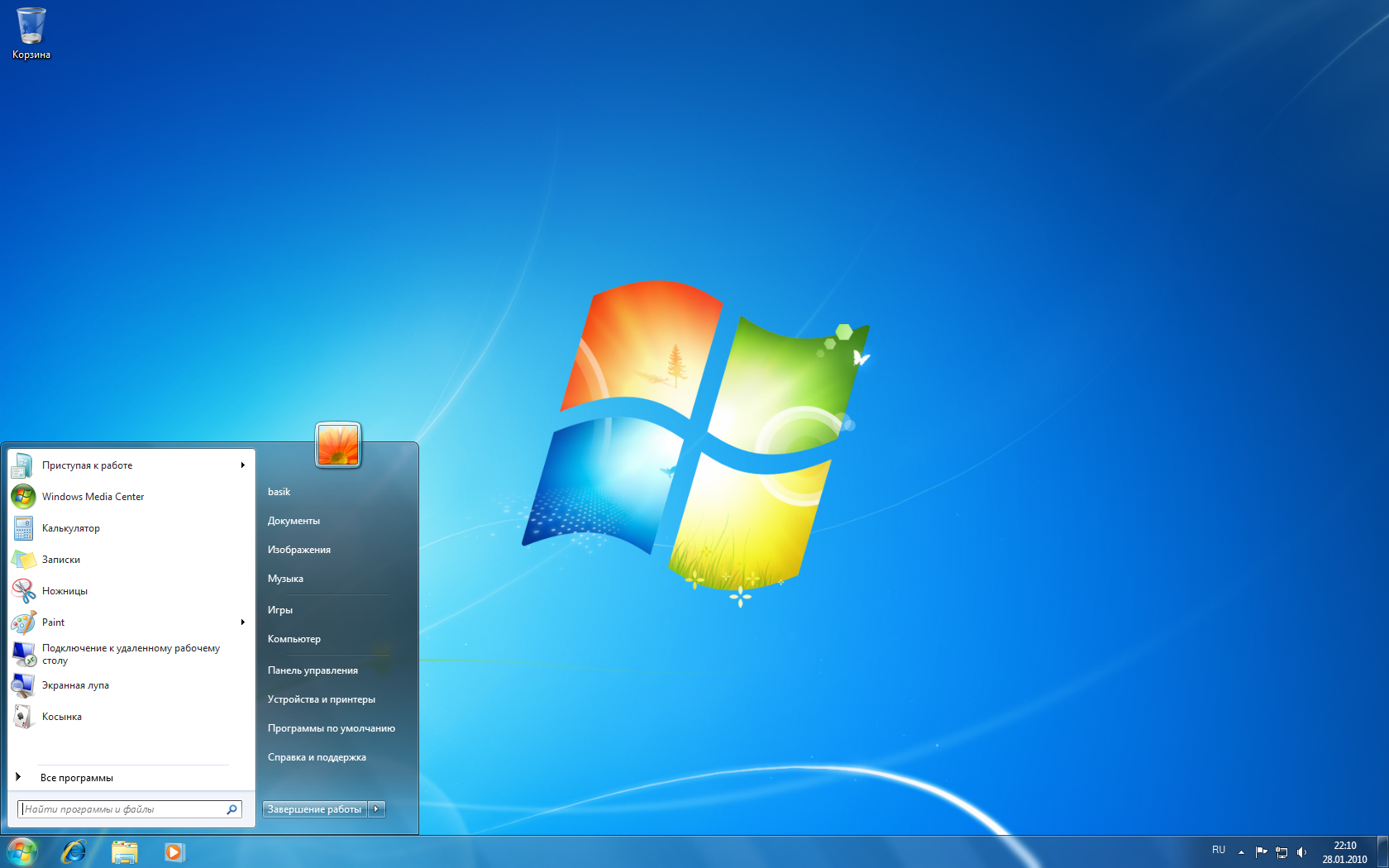
Windows 7 (image: www.wikipedia.org).
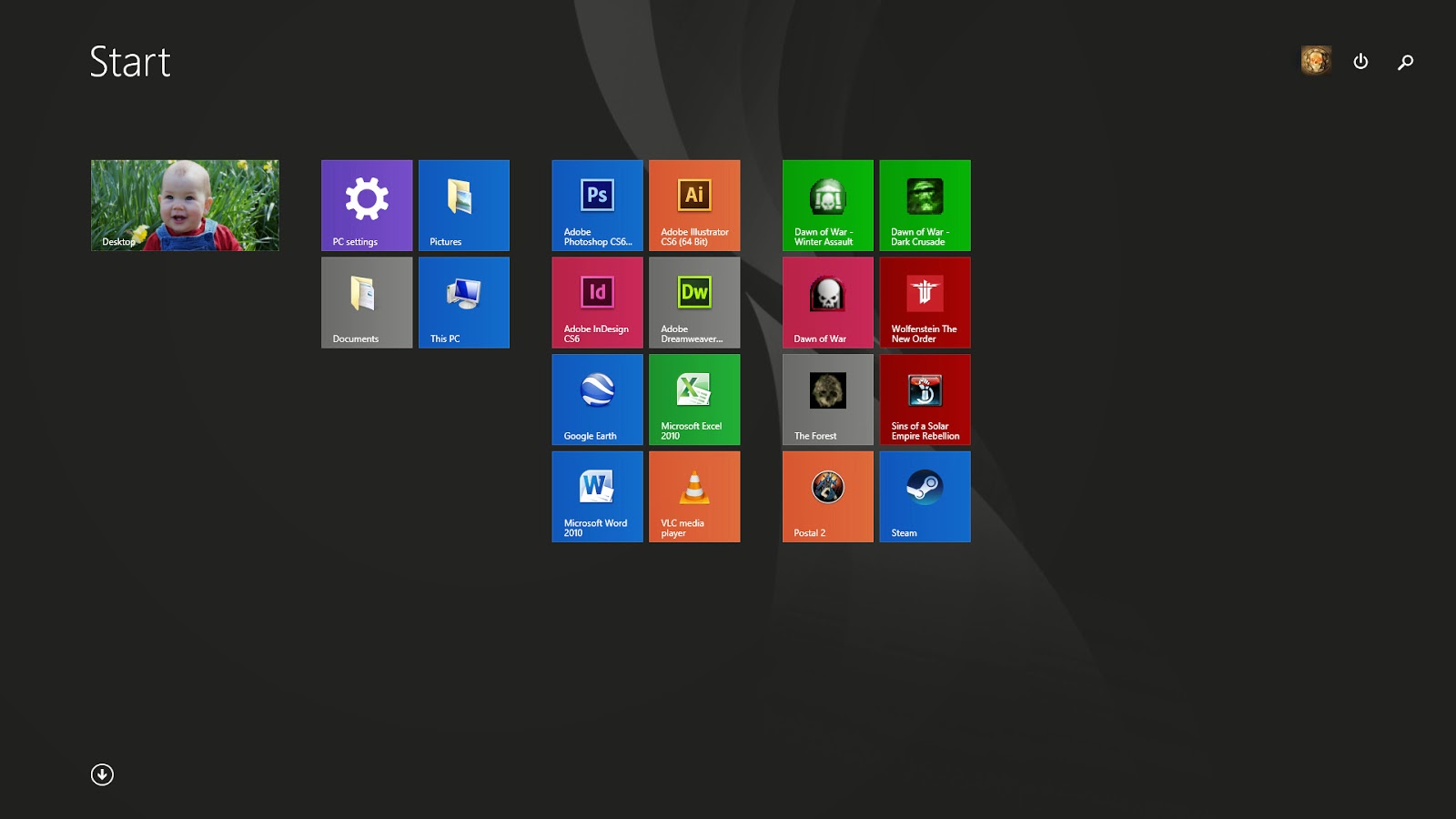
That said, one of the things that I appreciate about the Windows 7 start menu is that it is discrete. Let’s say I’m working in Illustrator and need to open the calculator. I hit the Windows Key, the start menu pops up occupying a small corner of the screen. I quickly type ‘calc’ and I’m away. It’s not overly distracting, I can keep focused on my work while doing it, most of the time I keep working without even noticing it. That was the main problem I had with Windows 8 - hitting the Windows key changed the entire desktop to the Metro start screen. The transition is jarring, distracting, and ultimately destroys my train of thought. When a UI is well designed you shouldn't notice it at all.

Unity's dash is no where near as distracting as the Windows 8 start screen, but I feel it is perhaps a little large for my liking - occupying between one quarter to one third of the screen space whenever the windows key is tapped. That said, where Metro succeeded, particularly with Window's 8.1, was tidying up the start menu - getting away from the mess of nested folders that the traditional start menu often devolves into, and making it easy to find what you were looking for quickly. The dash also does a great job of presenting a tidy interface, presenting the icons you need while filtering out the crap. The dash may be the best compromise between the discrete but cluttered traditional start menu and the jarring but well organised Metro start screen. I would need to spend more time with the dash to really get a feel for it.

Ultimately criticisms of this nature against Linux are a moot point as both the graphical shell and desktop environment can be swapped for other alternatives. Don't like the UI? Just try another one. And really this level of customisation is a massive advantage of Linux over Windows. How much better would Window's 8 have done had users had the ability to simply swap out Metro for something else? And for a media PC it's a non issue anyway.

Windows 8.1 start screen

Start-up and Shutdown: Something else really like about Ubuntu is the blazingly fast start-up and shutdown speeds. Shutdown in particular in simply astounding, especially against Windows 7 which feels very sluggish by comparison. I will totally acknowledge though that Microsoft has made huge advances in this area with Windows 8 and Windows 10, but still nowhere near as fast a Ubuntu.


The Big Negative - Initial Setup

So far for me the big area where Ubuntu completely falls over compared to Windows is the initial setup. The installation itself is very straight forward. The installer offers a fair amount of customisation, and does a fair job of explaining what each option means. But after the OS is installed the learning curve to actually set it up skyrockets.

The beautiful thing about Windows in 2015 is that it just works. After the initial installation the OS needs the minimum of fuss to get it on it's feet. Back in October I installed the Windows 10 preview on my old 2012 Samsung NP350V5C Laptop. Windows automatically recognised and installed all the hardware with the exception of the SD card reader and the graphics card (hybrid Intel 4000 / AMD HD 7670M). After installing those two driver packages and the settings app (needed for the volume and screen brightness keys to work) the computer was ready to go. Everything works.

Ubuntu is in no way that simple.


Windows 7 device manager
No Device Manager? For example, simply checking that all connected devices are working. Typically Windows does not recognise the media PCs TV capture card automatically and I have to manually install the driver. I wanted to make sure that the TV capture card was functioning under Ubuntu. So I went into System Settings expecting to see something like Windows device manager. No dice - nothing like that is installed in Ubuntu by default...

So I headed online where people were suggesting the terminal command sudo lshw - which has the effect of vomiting several pages of data about all connected devices onto the terminal, making finding information about a single, perhaps non functional, component very cumbersome... People have also suggested searching through the repository and downloading a device manager app, which I am yet to look into. Who knew something so simple would be so hard to accomplish.

At first I thought that the lack of a device manager app was due to Ubuntu wanting to be as lightweight as possible - perhaps to avoid the software bloat that affects Windows, or to give users full options for customisation (an 'install what you want to use rather than what we tell you to use' mentality). But then Ubuntu ships with a full installation of Libre Office, Firefox, a screenshot app and other software so obviously software bloat isn't a major concern to Ubuntu. A simple device manager would have a far lesser footprint in terms of software bloat than a full office suite. Why Ubuntu doesn't ship with a basic graphical tool to easily identify and diagnose hardware faults is beyond me.


Playing Video: Next thing. It appears that by default Ubuntu treats video playback as the system being left idle. As a result Ubuntu would turn the screen off and then go to the lock screen every 10 minutes when watching video. It didn't matter what I was using to watch video (Chrome, Kodi, VLC) - a seriously annoying fault for a media PC. To be honest I find this absolutely baffling - in a world where streaming is overtaking live TV why would an operating system's default setting be to turn the screen off during video playback?

Again I hit the net. Suggested solutions included going into every individual app to check if they can be set to disable screen locking, using a combination of System Settings and the terminal to disable the system lock and screensaver entirely (not ideal), and using a script to simulate mouse movements to trick the system into thinking you have interacted with it.

I ended up installing an app called Caffeine which disables Ubuntu's lock when an app is in full screen mode. Something of a headache in itself. Caffeine isn't available through the repositories, so installing it required a crash course in using the terminal and installing PPA packages.

A huge amount of effort for something so simple, and that Windows does by default.


Still More Problems: Those are the more annoying examples, but the system has a variety of other bugs that I still need to tackle;

1)  - Ubuntu doesn't appear to have an equivalent app to AMD Catalyst for easily adjusting colour. I'm using the default community developed open source Radeon driver. Under Colour in System Settings it tells me that my TV doesn't have a profile suitable for whole-screen colour correction. Hit the net. People are saying you need other (expensive) hardware and correct profiles to calibrate monitors. Others are saying you can input colour adjustments through the terminal assuming you know the colour you want, which seems like a lot of trial and error to me... I just want to knock the saturation form a little...

2) - The computer won't go to sleep / hibernation. This was a problem before I installed Caffeine.

3) - The mouse responsiveness is kind of sketchy. On the desktop the mouse behaves a little twitchy, but in Kodi it barely functions at all with the cursor either moving very slowly or not responding to clicks (sometimes both).


So that's my first impression. I certainly like Ubuntu, and I can see that it's a very capable operating system. I also understand that I've only scratched the surface. Still, anyone going into Linux as an absolute newbie best be prepared for an uphill start.

Wednesday, 20 May 2015

First Impressions of Linux from a Windows User

 
Image: www.wikipedia.org
I recently decided to try out Linux for the first time as a primary operating system for my media PC. And I'm finding it a bit of a mixed bag... Not bad. But somewhat frustrating. Certainly not the Linux computing utopia that some claim.

I have been a Windows user most of my life - starting when my parents picked up a second hand PC with Windows 95 way back when I was 12. I’m very comfortable and competent working with Windows, and I genuinely like Windows as an OS.

But recently I’ve been thinking about moving some of my PC’s onto other systems. I’ve always had a bit of an interest in Linux (dabbling here and there with live CD's), and certainly feel that Microsoft could use a bit more competition in the marketplace. I also haven’t been very impressed with Microsoft’s moves to make Windows a closed ecosystem. Finally, I had been using Windows 7 on the Media PC, but as Windows Media Centre no longer comes free with Windows if I want to be able to record live TV on future media PC builds (or upgrade to a more recent Windows version) then I’m going to have to find another solution anyway. Or pay Microsoft’s MCE tax on top of the price of Windows. So why not try Linux?

So two weeks ago I installed the latest Ubuntu (15.04) on my media PC. As a long time Windows user, and complete Linux newbie, I wanted to post my first impressions of using Linux as a everyday OS.

Linux Media PC Specs

My media PC is a repurposed desktop PC connected by HDMI to a 1080p Samsung smart TV. The PC has the following specs (with everything running at stock);

CPU: Core i5 2400
MOTHERBOARD: Asus P8Z68-V/GEN3
RAM: 8GB G.Skill Hyper X DDR3 1600mhz
GRAPHICS: Saphire Radeon HD 5750
STORAGE: OCZ Agility 2 Series SSD (SATA-300)
TV CAPTURE: Hauppauge WinTV-HVR-2200
INPUT: Logitech G700 wireless gaming mouse, generic Microsoft wireless keyboard


I chose vanilla Ubuntu using the stock Unity shell over a straight up media centre distro like Mythbuntu or Kodi because I ultimately still want the option to use the media PC as a full desktop PC with little fuss. The computer will also still be used for occasional gaming (thank you Steam in-home streaming). As a complete Linux newbie I don’t understand the limitations of the purpose built distros, and people often cite Ubuntu as the best distro for starting out, offering the minimum of complications and the best environment for learning.


Background

As is very apparent at this point, I am coming into Ubuntu as a complete novice. With the exception of some very shallow use of a Raspberry Pi, I know nothing about it.

That said, I’m certainly not a computer newbie. I’ve been repairing and maintaining systems since that first Windows 95 desktop back in 96, and upgrading/building my own systems 2004. As a gamer I’m very familiar with tweaking systems (both hardware and software) to get the best performance. I always sort my own computer problems and never take my systems to a shop. But I’m not a power user or coder, and certainly don’t know what actually goes into building an OS.

I also feel that I need to say that I’m not necessarily worried about open source versus closed source. If the software works then I’m happy. I’m also not worried about paying for software - if people want to make money from their efforts then who am I to complain?


First Impressions of Linux

(Here I’m going to outline my first impressions of Ubuntu after using the OS for two weeks. I will update this post with future impressions as I get more acquainted with Linux).

- First Two Weeks (21.05.2015): Headaches with first time setup, and an appreciation for the GNOME desktop.

- First Three Weeks  (03.06.2015): Attempts are made to setup a MythTV DVR, which ends in frustration. Ubuntu is abandoned on the media PC in favour of Windows 7.